Cold email follow up: write follow-ups that stop when they should
A practical plan for each cold email follow up: one new reason per message, fair spacing, a clear last note, and stop rules for replies, opt-outs and bounces.
Scouty ·
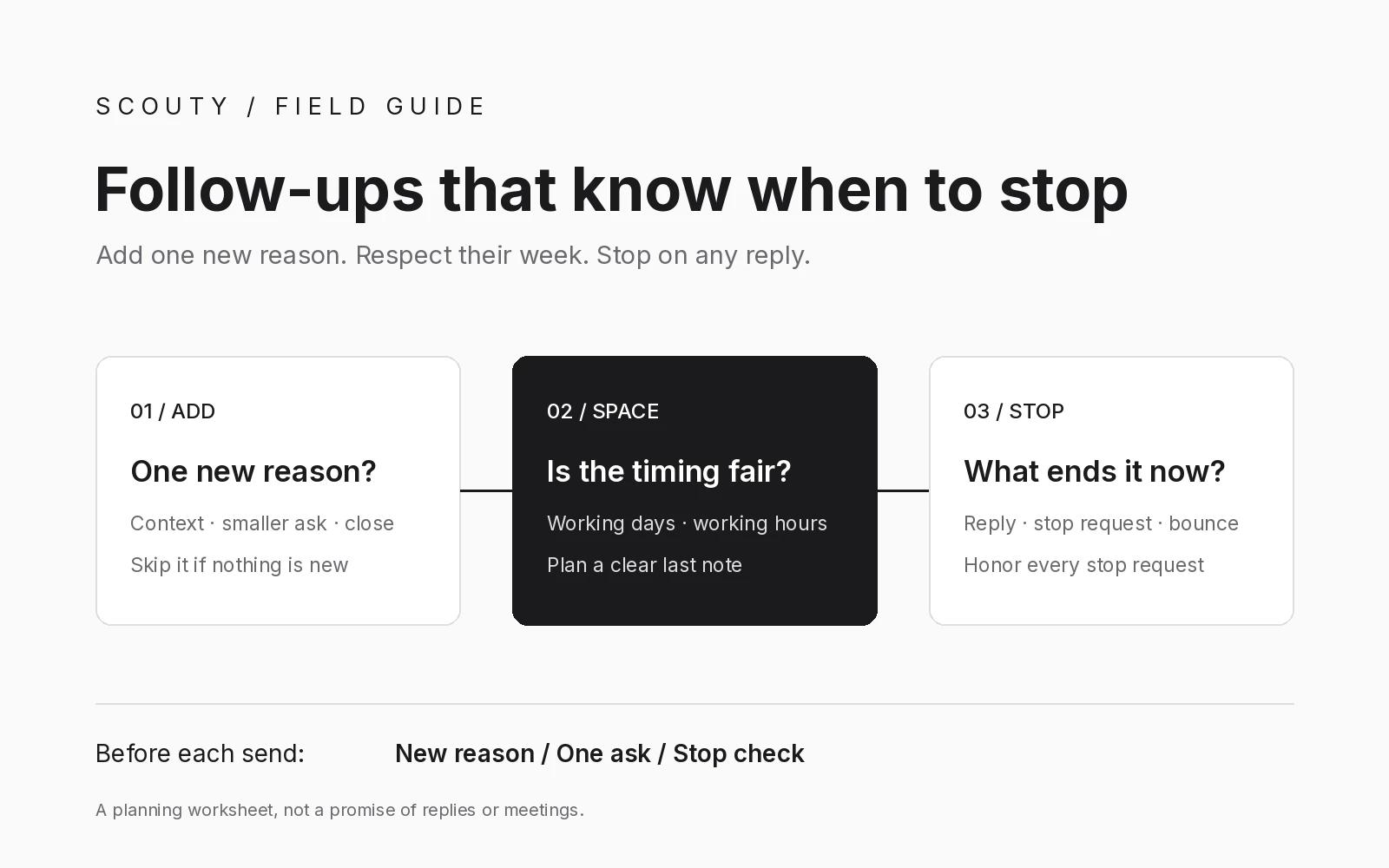
A good cold email follow up does two jobs. It gives the reader one new, useful reason to reply, and it stops the moment the conversation no longer needs it. Most advice covers the first job. This guide covers both, so every follow up email after no response is planned in advance, short, and easy to stop.
It is written for founders and small B2B teams sending personal outreach, not bulk campaigns. The schedule, wording and example company below are illustrations and working rules, not measured results or industry benchmarks.
1. Decide what stops the sequence before you write it
Write your stop rules first, while you are calm and nobody has replied yet. Once a sequence is running, it is easy to let one more message go out "just in case". A follow-up should end as soon as any of these happens:
- The person replies in any way, including "not now", a question or a referral to a colleague.
- The person asks you to stop, unsubscribe or remove them, in any wording.
- The email bounces, or you learn the address no longer reaches them.
- A meeting is booked, or someone else on your team is already talking to them.
- New information breaks your reason for writing, such as the person changing roles.
Stop requests deserve extra care. In the United States, the FTC's CAN-SPAM compliance guide says commercial email must tell recipients how to opt out, that opt-out requests must be honored within 10 business days, and that the law makes no exception for business-to-business email. Treat that deadline as a ceiling, not a target. A "please stop" should end every planned message right away. This is general information, not legal advice.
2. Give every follow-up one new reason to exist
"Bumping this to the top of your inbox" asks for attention without giving anything back. Before you write a follow-up, name the single new thing it adds. If you cannot name one, do not send it.
A short sequence of three follow-ups gives each message a different job:
- Add context. Share one specific observation or answer the question your first email probably raised.
- Lower the ask. Offer something smaller than a call, such as a short checklist or a yes or no question.
- Close the loop. Say this is your last note and explain how they can reach you later.
The new reason has to be true and relevant to the person. If your first email was weak because the match was weak, more follow-ups will not fix it. Go back to the evidence with our guide to building your first B2B prospect list from your website.
3. Space follow-ups so they respect the reader's week
A useful working rule: leave a few working days between messages, send during working hours in the recipient's time zone, and skip weekends. Decide the final date when you plan the sequence, not after the third message has gone out.
Keep the thread honest too. Google's email sender guidelines ask senders not to start subject lines with "Re:" or "Fwd:" unless the message really is a reply or a forward. Replying inside the real thread of your own first email is fine. Creating a new email that pretends to be part of a conversation is not.
4. Write the follow up email after no response
Keep each follow-up shorter than the first email. One idea, one ask, and your name. Fill in the worksheet below before you write a word.
Copy this follow-up worksheet
Make one row per follow-up and fill in each field:
- Original reason: the specific observation that justified the first email.
- New piece: the single fact, resource or question this message adds.
- Ask: one question the reader can answer in a sentence.
- Stop check: no reply, no stop request, no bounce, no role change since the last message.
- Send window: the working day and hours in the recipient's time zone.
- Last note: the date the sequence ends, whatever happens.
Three short follow-ups you can adapt
These are templates, not proven scripts. Replace every bracket with something true about the person.
Follow-up 1: Hi [first name], one more detail on my note about [topic]. [One specific, public observation]. Is [problem] something you are working on this quarter, or should I leave it?
Follow-up 2: Hi [first name], if a call is too much, would a one-page [checklist or example] on [topic] help? Happy to send it, no meeting needed.
Follow-up 3: Hi [first name], I will stop here so I am not cluttering your inbox. If [problem] comes up later, reply to this email and I will pick it up.
5. Handle replies, stop requests and edge cases
When a sequence stops, a person takes over. Answer a real reply yourself, in your own words. Record a "not now" with the date they gave you, and do not quietly add them to a new automated sequence. Remove a bounced address rather than guessing another one.
For a stop request, record it where your whole team will see it and do not email that person again from any campaign. The FTC guide also says you cannot sell or transfer the addresses of people who have opted out. If you are choosing a tool to run follow-ups, test these cases before you connect an inbox, using the checklist in our guide to evaluating an AI prospecting tool before connecting your inbox.
An illustration: Fernway Labs
Example, fictional company: Fernway Labs. A two-person analytics agency emails the head of finance at a software company on a Monday. No reply arrives, so the first follow-up goes out on Thursday with one new detail. On Friday the person replies: "Not my area, try our operations lead." The sequence stops. The founder thanks them personally, then researches the operations lead and writes a fresh first email, reviewed by hand, that mentions the referral truthfully. The new contact is not dropped into the old sequence.
Where Scouty fits
Scouty at scouty.to is a B2B prospecting and outreach tool for founders and small teams. You start with your website to find matching companies and decision makers, and you review and send the first email yourself. According to the Scouty FAQ, automatic follow-ups are optional: you enable them in a project and review and approve three messages before your first email goes out.
Scouty's follow-ups wait at least three days and send Monday to Friday, 9 AM to 5 PM in your chosen time zone. Any reply stops the sequence, and it ends after three follow-ups. You can stop pending messages at any time, although messages already being sent cannot be recalled. If someone asks you to stop, their reply is tracked in the conversation and you must honor that request. Scouty does not guarantee replies or meetings.
Questions about cold email follow up
How many follow-ups should I send after no response?
There is no universal number we can source, so plan a short sequence with a clear end. Three follow-ups, each with a new reason, is a reasonable ceiling for personal outreach. Scouty's automatic follow-ups end after three.
Should a follow-up go in the same thread?
Replying inside the real thread keeps context for the reader. Do not fake a thread with "Re:" on a new message, which Google's sender guidelines ask senders to avoid.
Should I follow up because someone opened my email?
Be careful. Google's sender guidelines note that Gmail does not track open rates and that low open rates are not necessarily an accurate indicator of deliverability. Base follow-ups on your plan and the person's replies, not on an open.
Is "just checking in" ever fine?
It is polite, but it adds nothing. Pair it with the one new piece from your worksheet, or skip the message.
Sources and next step
FTC: CAN-SPAM Act compliance guide for business
Gmail Help: email sender guidelines
Scouty blog: build your first B2B prospect list from your website
Scouty blog: evaluate an AI prospecting tool before connecting your inbox