How to evaluate an AI prospecting tool before connecting your inbox
A practical worksheet for checking prospect evidence, message review, follow-up stop controls and calendar handling before connecting an outreach tool.
Scouty ·
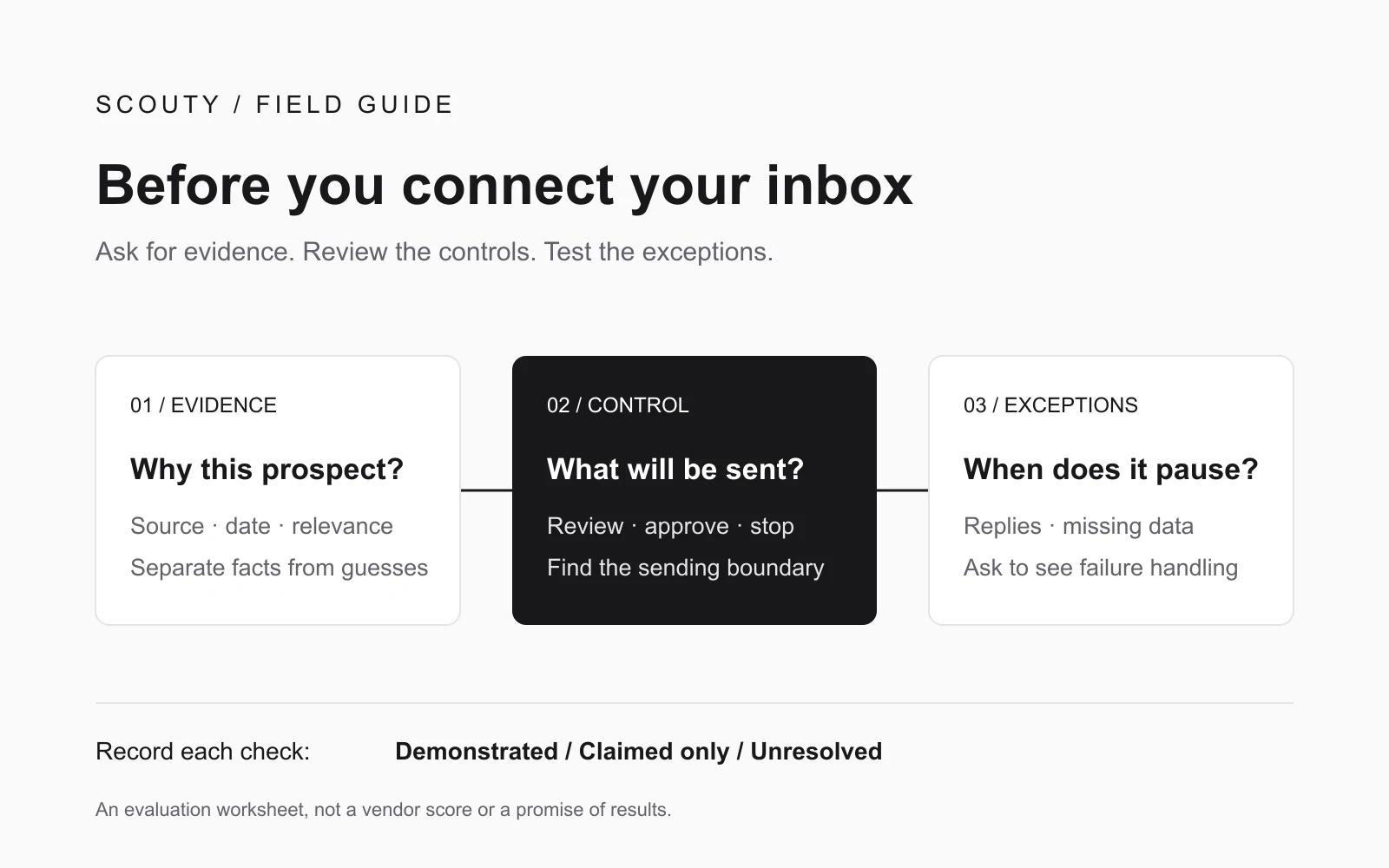
Before connecting an inbox, ask an AI prospecting tool to show you five things: the evidence behind a company match, the exact message it will send, what you approve, what stops a follow-up, and how it handles missing information. A polished email preview is only one part of that decision.
This guide gives a small B2B team a practical evaluation worksheet. It is an original decision aid, not a vendor ranking or a validated scoring model. Use fictional records and a vendor-supported test environment for demonstrations that might otherwise contact a real person. Keep real sending disabled while you evaluate.
1. Decide what a useful demonstration must prove
Write your desired outcome before the demo: “I want to review a relevant company and person, approve a truthful message, and know when automation will pause.” That makes the conversation more useful than comparing the number of contacts in a database.
Ask the vendor to follow one record through the whole process. Which observations support the match? Which details are inferred? Where can you correct the draft? What happens after a reply? Record whether each answer was demonstrated, described without evidence, or left unresolved. A missing answer calls for investigation; it does not prove that a product is unsafe.
2. Inspect evidence before contact volume
Choose one sample company and ask to see a source URL, a date checked, and a plain explanation of why the observation matters to your offer. A hiring page can suggest a team priority. It cannot establish that the company has a budget for you or wants to buy.
3. Find the boundary between drafting and sending
Ask to see the exact recipient, sender address, subject and body before a first email can leave. Find out whether editing a draft changes an existing approval, whether follow-ups need separate approval, and where you can stop a sequence. Do not assume a preview button is an approval control.
Review factual claims as carefully as tone. Replace “your onboarding is losing customers” with a specific public observation and a modest question. A generated sentence should not imply knowledge of a company's private performance.
4. Request three failure demonstrations
A reply arrives before the next follow-up
In a supported test setup, have a controlled recipient reply while a follow-up is pending. Ask to see what stops, how the reply is matched to the conversation, and whether a human needs to act. Also ask what happens if another teammate sends a manual response.
The tool cannot verify the conversation
Ask the vendor to demonstrate or explain an unavailable-mailbox scenario using test fixtures. Does the system pause, surface uncertainty, or continue sending? Request a clear distinction between a message queued, a provider-confirmed send, and an unknown outcome. Do not rerun an uncertain send just because a success screen is missing.
Calendar availability cannot be retrieved
5. Copy this evaluation worksheet
Create one row for each check below. For every row, record: evidence observed; demonstrated / claimed only / unresolved; person responsible for the open question; next action. Keep the evidence, not just a total score.
Company fit: source URL, observation date, reason for the match and any contradictory evidence.
Contact relevance: current role, connection to the problem and the meaning of the contact-data status.
First email: exact editable message, sender identity and the action that authorizes sending.
Follow-ups: approved content, schedule, sequence limit and visible stop control.
Replies and failures: what stops after a reply, what happens when verification fails, and how uncertain sends are resolved.
Calendar: response to a busy slot, missing availability and time-zone ambiguity.
Account access: permissions requested, the reason for each permission, how to disconnect, and what data remains afterward. Read the provider's current documentation; do not infer deletion from a disconnected status.
A worked decision: fictional Northline Studio
Northline Studio is a fictional two-person agency evaluating outreach software. In its demo, a sample company has a dated source and a plausible reason for fit. The first email is editable and its send action is clear. Follow-ups can be approved separately. However, the presenter only describes what happens when calendar access fails.
The team's record is specific: company evidence and message review demonstrated; calendar failure handling claimed only; access and retention questions unresolved. Its next step is to request a controlled failure demonstration and written access details before connecting a real inbox. It does not conclude that the tool is bad, and it does not expand the test into live prospect outreach.
Where Scouty fits
Use the same worksheet when evaluating Scouty. Inspect the research, remove weak matches and review what you plan to send. Keep a reply, an interested reply and a confirmed meeting as separate outcomes. Neither a fit score nor a generated message guarantees any of them.
Start with your website and inspect the research before deciding to send.